Trademark monitoring usually starts with a list of matches.
That list is useful while reviewing results, but it is not always the best format when the findings need to be shared with a client, colleague, manager, legal team, or brand owner.
BrandCat can now turn trademark monitoring results into saved, shareable reports with summary charts, office and match-type breakdowns, detailed trademark records, and downloads in HTML, PDF, and CSV formats.
Reports are generated in the background, saved inside the account, and emailed to the user when they are ready.
From monitoring results to a report
A monitoring result page is designed for investigation. It helps users search, filter, compare, and review trademark matches.
A report has a different job.
It should present the selected results in a format that is easier to read, save, send, or discuss with someone who may not use BrandCat every day.
BrandCat reports are generated from monitored trademark results after the user has reviewed the relevant keyword and selected the result set they want to include.
The report records the keyword, generation time, number of matches, and filters used. This creates a useful snapshot of the results at the time the report was requested.
A visual summary of the results
Each report begins with a compact overview of the monitored keyword and the selected result set.
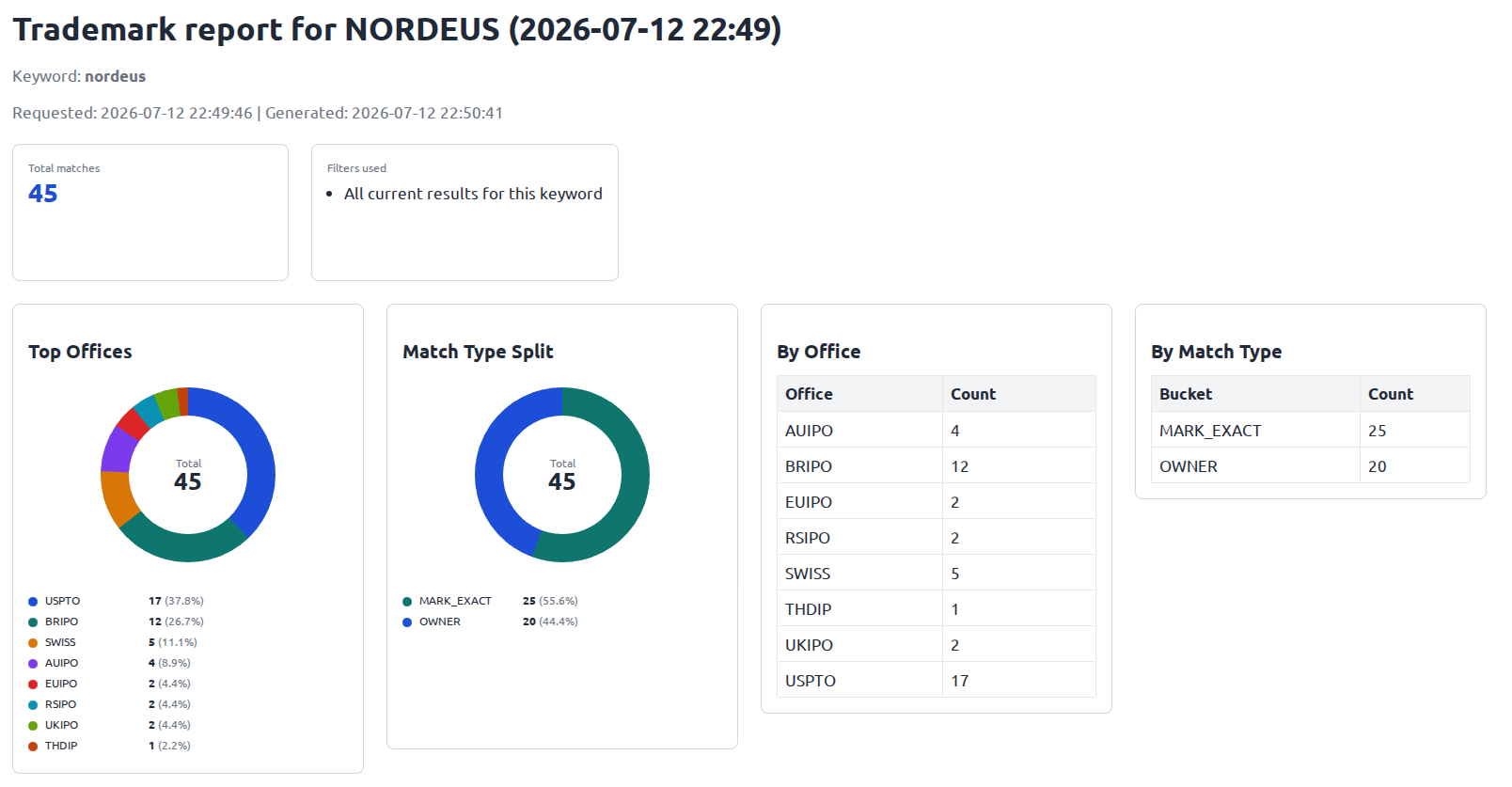
The summary can include:
- total number of matches
- filters used to generate the report
- top trademark offices represented in the results
- office-by-office result counts
- match-type distribution
- counts for exact marks, owner matches, prefix matches, variations, and other supported match types
The charts provide a quick overview, while the tables keep the exact numbers visible.
This makes it easier to answer basic questions before reading every individual record. Which offices produced most of the results? How many matches were exact trademark-name matches? How many were connected through the owner or applicant field? Is the result set concentrated in one jurisdiction or spread across several offices?
Reports are not limited to one kind of trademark match
The reporting system works with BrandCat's trademark monitoring results generally. It is not limited to the newer owner and applicant monitoring feature.
A report can contain normal trademark-name matches, including exact and similar marks, as well as matches found through owner or applicant data when those results are part of the selected monitoring set.
In the example above, the report contains both exact trademark-name matches and records connected through the owner field.
This is useful because a trademark portfolio is rarely represented by one repeated word mark alone. A company may own many brands, product names, game titles, slogans, logos, and regional registrations. Owner and applicant matches can reveal those filings even when the monitored company name does not appear in the trademark itself.
The complete trademark records remain available
Charts are useful for orientation, but legal and brand-protection work still depends on the underlying records.
Each report therefore includes the detailed trademark matches below the summary.
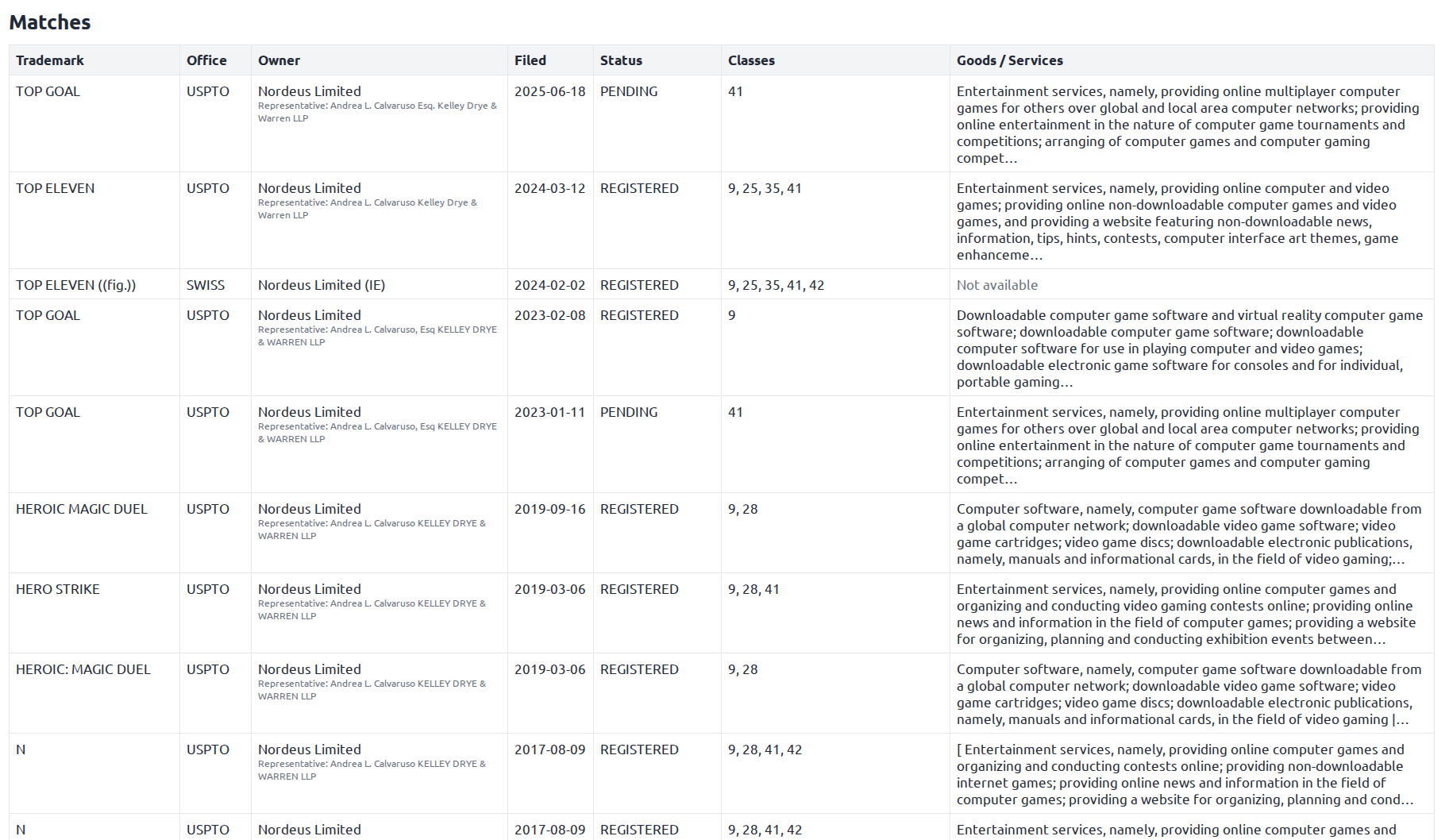
Depending on the available registry data, report rows can include:
- trademark name
- trademark office
- owner or applicant
- representative or correspondent
- filing date
- status
- Nice classes
- goods and services
This allows the same report to serve two audiences.
Someone who needs a quick overview can use the charts and totals. Someone reviewing the legal or commercial significance of individual filings can continue into the detailed match list.
HTML, PDF, and CSV downloads
Different people need trademark data in different formats, so BrandCat does not force every report into one output.
Reports can be opened as HTML directly in the browser, downloaded as PDF, or exported as CSV.
HTML is useful for quickly opening and reviewing the report in a browser.
PDF is useful for sharing a stable, presentation-friendly version with clients, managers, colleagues, or internal legal teams.
CSV is useful when the underlying records need to be filtered, compared, imported, or analysed further in spreadsheet or internal reporting tools.
The same saved report can therefore be used as a visual summary, a formal attachment, or a structured data export.
A saved report library
Generated reports remain available in a dedicated Trademark Reports section inside BrandCat.
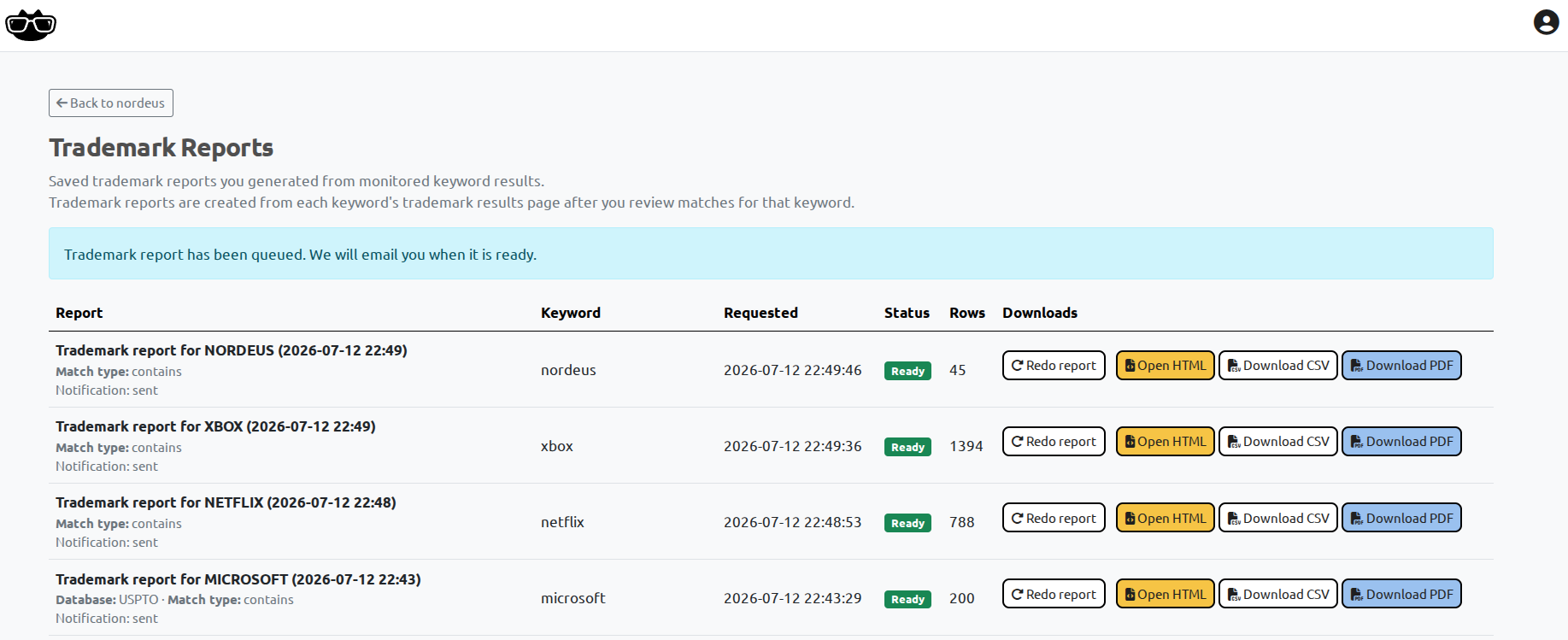
The report library shows:
- report name and generation time
- monitored keyword
- requested time
- generation status
- number of result rows
- email notification status
- HTML, CSV, and PDF download options
- an option to generate the report again
This makes reports reusable instead of temporary. A user can return to an earlier report, download it in another format, or regenerate it after the underlying monitoring results have changed.
Generated in the background, delivered by email
Some monitored keywords can have hundreds or thousands of trademark matches. Building charts, formatting records, and producing multiple downloadable files can take longer than an ordinary page request.
BrandCat therefore queues report generation in the background.
The user can continue working while the report is prepared. When it is ready, BrandCat sends an email notification and keeps the finished report in the account's report library.
This is especially useful for larger reports that do not need to keep a browser tab open while the files are being created.
Built for lawyers, brand owners, and internal teams
A trademark monitoring tool should help users find relevant filings. It should also help them explain what was found.
The new report workflow is designed for situations such as:
- a trademark lawyer preparing an update for a client
- an in-house legal team briefing management
- a brand-protection team reviewing activity across several jurisdictions
- a company tracking filings made by a competitor
- a portfolio manager creating a periodic summary
- an analyst exporting results for additional review
The report does not decide whether a trademark is conflicting, infringing, or legally actionable. Those decisions still require human review and, where appropriate, legal analysis.
Its purpose is to make the relevant monitoring results easier to organise, present, and share.
What changed in BrandCat
BrandCat's new trademark reporting system now provides:
- saved reports generated from monitored trademark results
- a record of the filters used
- summary totals and visual charts
- trademark office breakdowns
- match-type breakdowns
- detailed trademark result tables
- owner, applicant, representative, and correspondent information where available
- Nice classes and goods and services where available
- browser-based HTML reports
- downloadable PDF reports
- downloadable CSV exports
- background report generation
- email notification when a report is ready
- a dedicated report library
- the ability to regenerate reports later
This turns BrandCat's trademark monitoring results into something users can not only review, but also deliver to the people who need to see them.
Start monitoring and reporting on trademark activity
BrandCat monitors trademark names, owners, applicants, and other available trademark fields across supported offices, then helps users review and report on the results from one account.
Or contact us to discuss your trademark monitoring and reporting needs:
