We've spent a good part of the last few weeks reworking BrandCat's trademark monitoring.
Some of it was overdue. BrandCat was originally much more domain-oriented, and trademark monitoring grew into it later. That left a few places where domains and trademarks were sharing concepts simply because that was convenient at the time.
It stopped being convenient once trademark monitoring got more serious.
Trademark Watches, Domain Watches, Entity Monitors and copycat website monitoring now live much more independently inside BrandCat. Apart from making the code considerably less strange, this gave us room to add the things that make sense specifically for trademark watching: per-mark Nice classes, portfolio/client grouping, consolidated alerts, portfolio-level reports, Excel exports and a proper review workflow.
Here is what changed.
Each watched mark can have its own Nice classes
Nice class filtering now belongs to the individual Trademark Watch.
That matters once you monitor more than one mark. One product name may be relevant in Classes 9 and 42, another in 7 and 11, and a third one may need a much broader scope. BrandCat keeps those settings with the watched mark instead of treating the whole account as one giant set of trademark search settings.
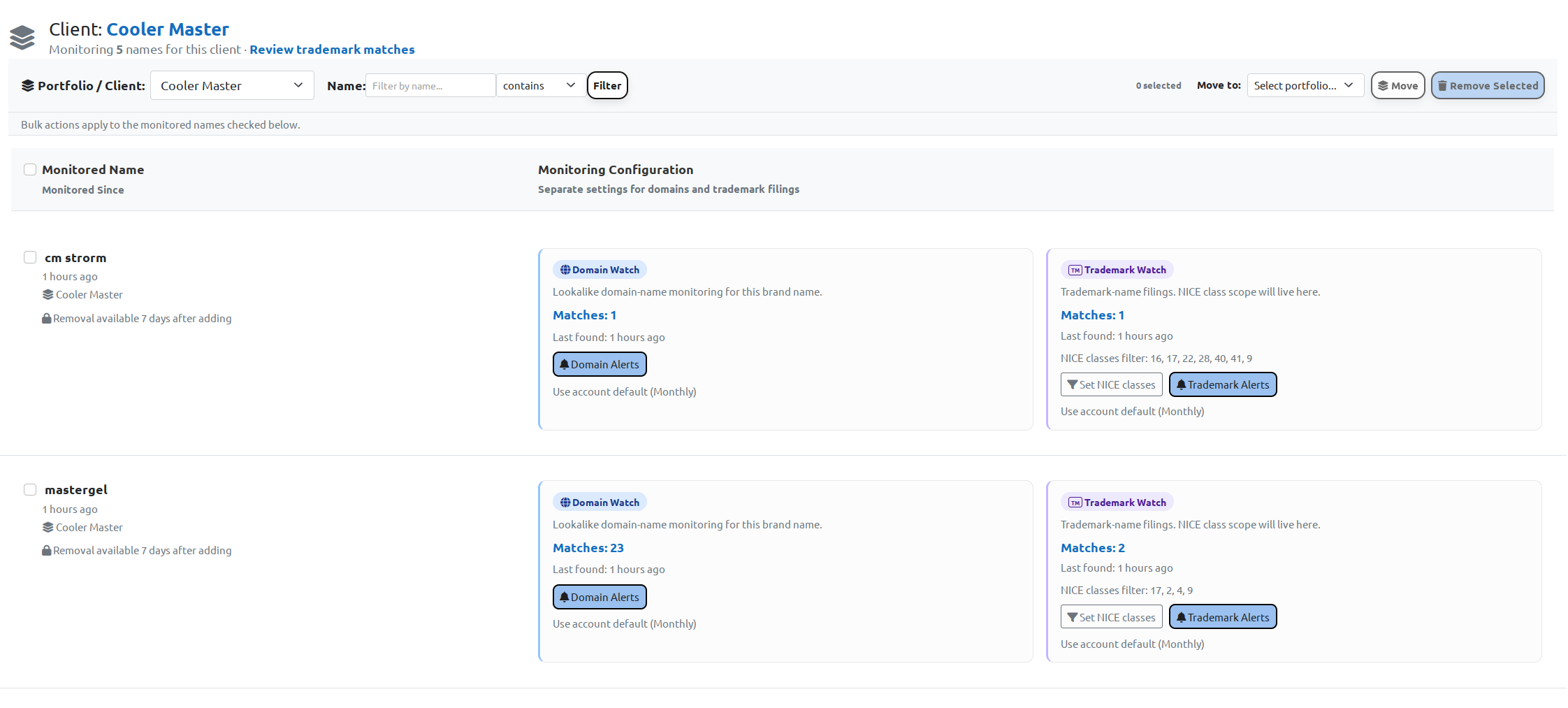
For the screenshots in this post I used Cooler Master as a public example. It is a useful example because a company with a number of product and sub-brand names is exactly where portfolio-level watching starts to make sense.
In the portfolio below, names such as CM STORM and MASTERGEL have their own Trademark Watch settings and their own Nice class scopes. Domain monitoring for the same names can still be configured separately.
BrandCat now shows which classes actually matched
Based on feedback from users doing actual trademark review, one of the more useful things to show was the class overlap directly on each result.
The trademark result view now shows the watched classes, the classes on the reported trademark, and the classes that match between them.
So instead of opening a filing and comparing two lists manually, you can see something like:
Watched classes: 7, 9, 35, 38, 40
Reported trademark class: 9
Matching: 9
All of this is not really that helpful for a few results, but it's a lifesaver when reviewing a few hundred of them.
The same screen also gives you the reported trademark, trademark office, owner/applicant, filing date, status and Goods & Services data collected by BrandCat.
Portfolios and Clients
The other big change is grouping.
You can now put related monitored names into a Portfolio or Client.
For somebody protecting their own brands, a portfolio might represent a company, product family, business unit or simply a convenient group of names.
For a trademark firm, the obvious use is one Client per customer.
The group can contain more than Trademark Watches. Domain Watches, Entity Monitors and copycat monitoring can live under the same Portfolio / Client as well.
In the Cooler Master example, five monitored names are grouped under one client and each name keeps its own monitoring configuration.
This also gets rid of one of the annoying parts of a large watch list: having to remember which watched name belongs to which company every time you open the results.
One trademark review screen for the whole client or portfolio
This is probably the part I like most.
You can open a Client or Portfolio and review trademark matches across all of the watched names inside it.
Each row still tells you which name produced the match and which Nice classes were relevant. The class scope from one watched mark does not spill into another one.
For example, the screenshot below contains results for several watched names in the same Cooler Master portfolio, including NOTEPAL and MASTERFRAME. Each result shows its own watched-class scope and the matching class from the reported trademark.
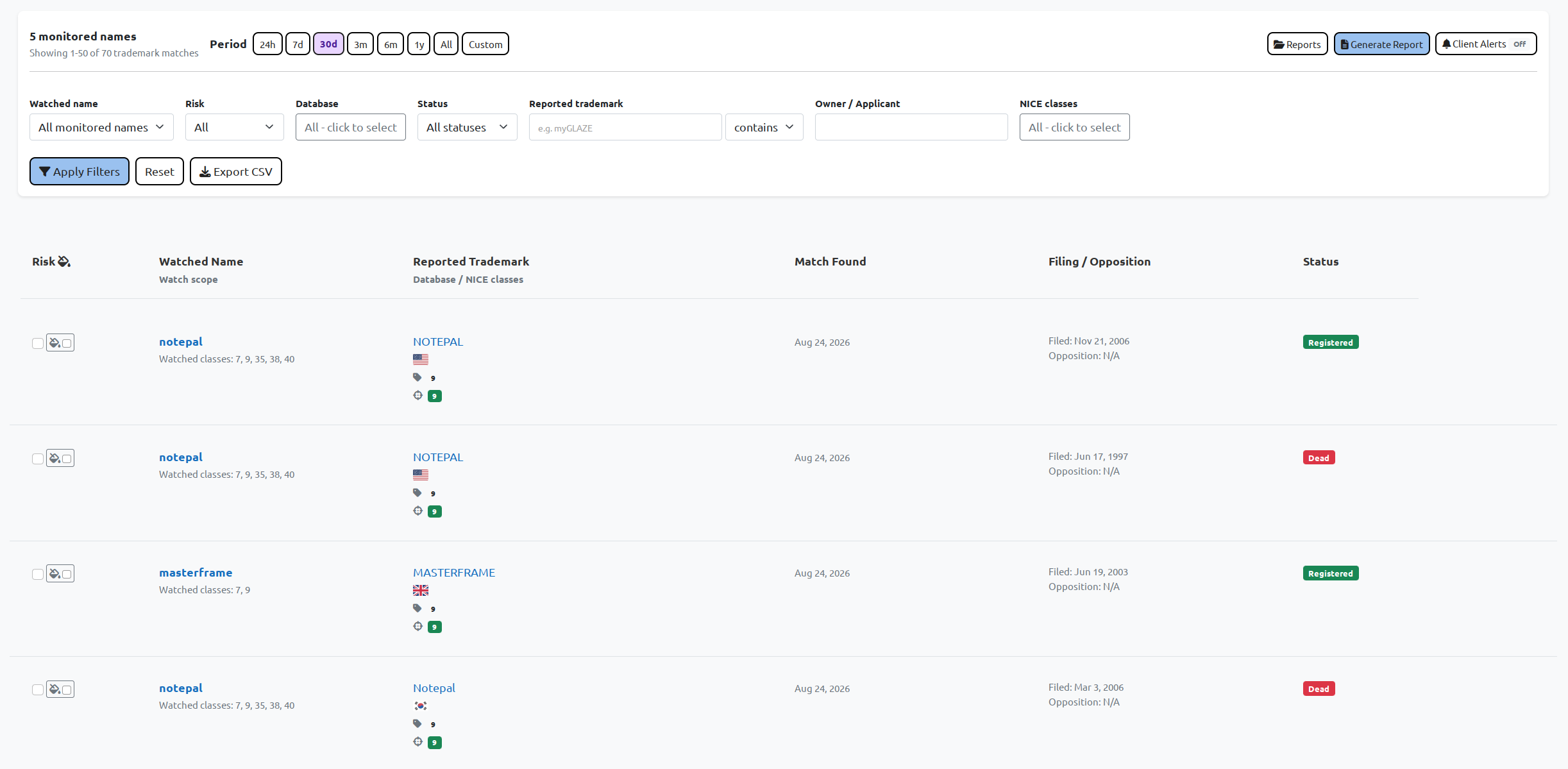
From the same page you can filter by:
- watched name
- risk
- trademark database
- status
- reported trademark
- owner/applicant
- Nice classes
You can still drill down to one watched mark whenever you want. The portfolio view is there for the times when the actual job is "review this client's watches" rather than "look at this one search term".
24 hours, 7 days, 30 days, or whatever period you need
Watch reports are usually about what changed since the last review, so I added quick period controls to the portfolio-level trademark screen.
The built-in options are:
- 24 hours
- 7 days
- 30 days
- 3 months
- 6 months
- 1 year
- all results
- custom period
So a weekly review can be seven days, a monthly report can be thirty days, and an older matter can still be searched across a custom range without creating another reporting screen.
The period applies across the watched names in the selected Portfolio / Client.
Filing and opposition information
Filing and opposition information is now part of the portfolio review as well.
Where the necessary source data is available, BrandCat shows the filing date and opposition information next to the result and carries it into generated reports.
That puts the timing information in the same place where the mark itself is being reviewed instead of making the reviewer jump between screens.
You can paint the risky ones 🙂
One practical request I got while discussing trademark watch reports was a way to mark risk during review.
So now you can select results and assign a risk colour directly inside BrandCat.
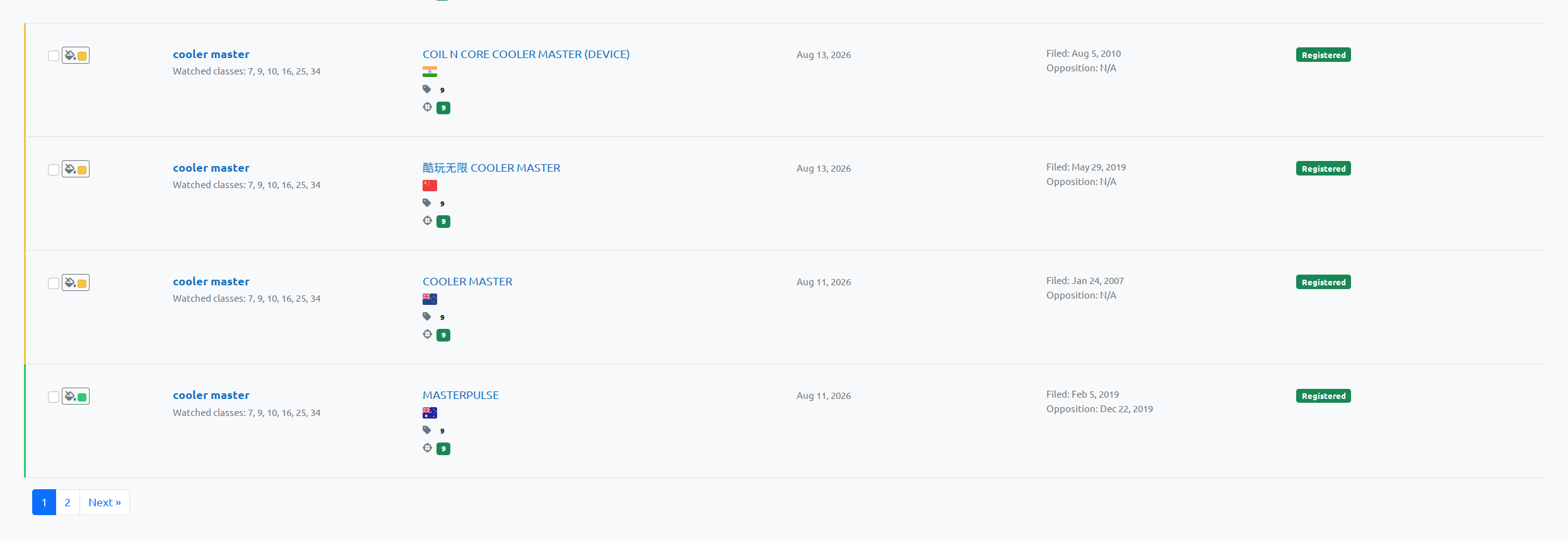
The risk is stored with the reviewed result and can be included in the report/export.
The Excel version also has a RISK field, so if the preferred workflow is to do the final review in Excel, that still works perfectly well.
Reports now work at Client / Portfolio level
Reports are no longer limited to one watched name at a time.
You can generate a report for the whole Client or Portfolio and include all relevant matches from the selected period.
BrandCat keeps the context for every row, including:
- which watched name produced it
- watched Nice classes
- reported trademark
- reported Nice classes
- matching Nice classes
- office/database
- owner/applicant
- filing and opposition information
- status
- Goods & Services
- risk/review information
This is the part that makes Portfolios more than a folder in the UI. The grouping now follows the watches into the actual review and reporting workflow.
Excel watch reports
Trademark watch reports can now be exported to Excel for the whole Client or Portfolio and the selected reporting period.
The spreadsheet keeps the review context from BrandCat together in one place, including the watched mark, reported trademark, application and registration information, watched classes, reported classes, matching classes, Goods & Services, filing and opposition information, status, risk and the other review fields.
Risk markings made inside BrandCat are carried into the spreadsheet as well, and the RISK/review fields can still be edited normally in Excel afterwards.
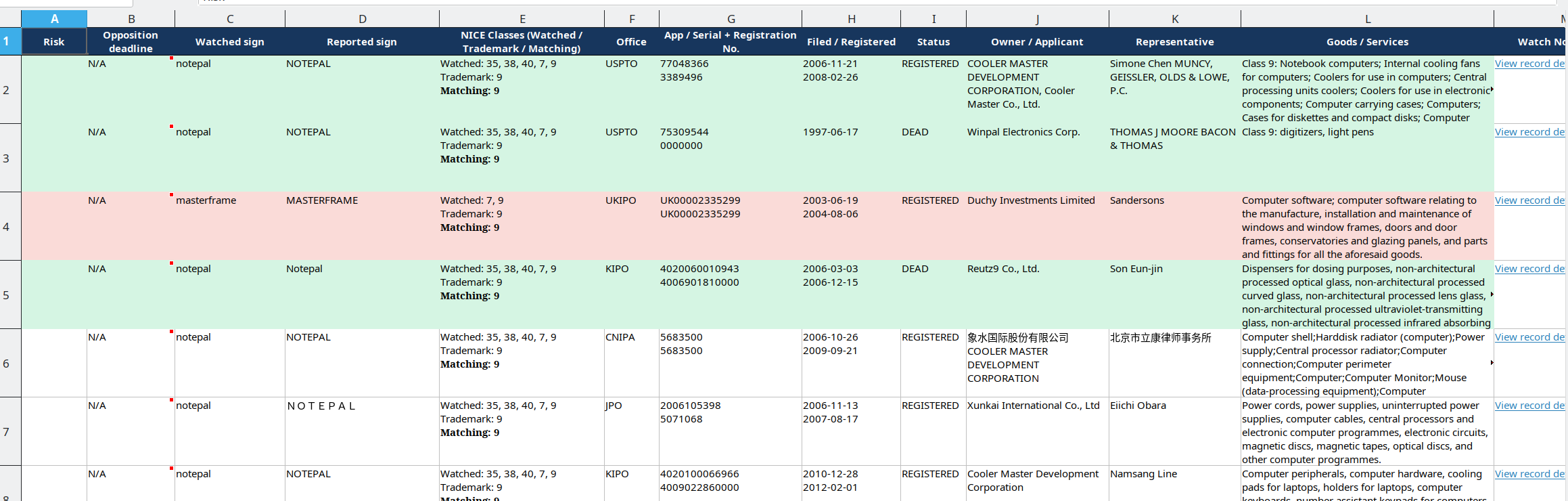
Every row also includes a direct link to the corresponding trademark record in BrandCat. These links can be opened without logging in, which makes them useful when a report is being sent to a client or passed around internally.
For example, one of the USPTO records from the demo report can be opened directly here:
👉 NOTEPAL, USPTO Serial No. 77048366
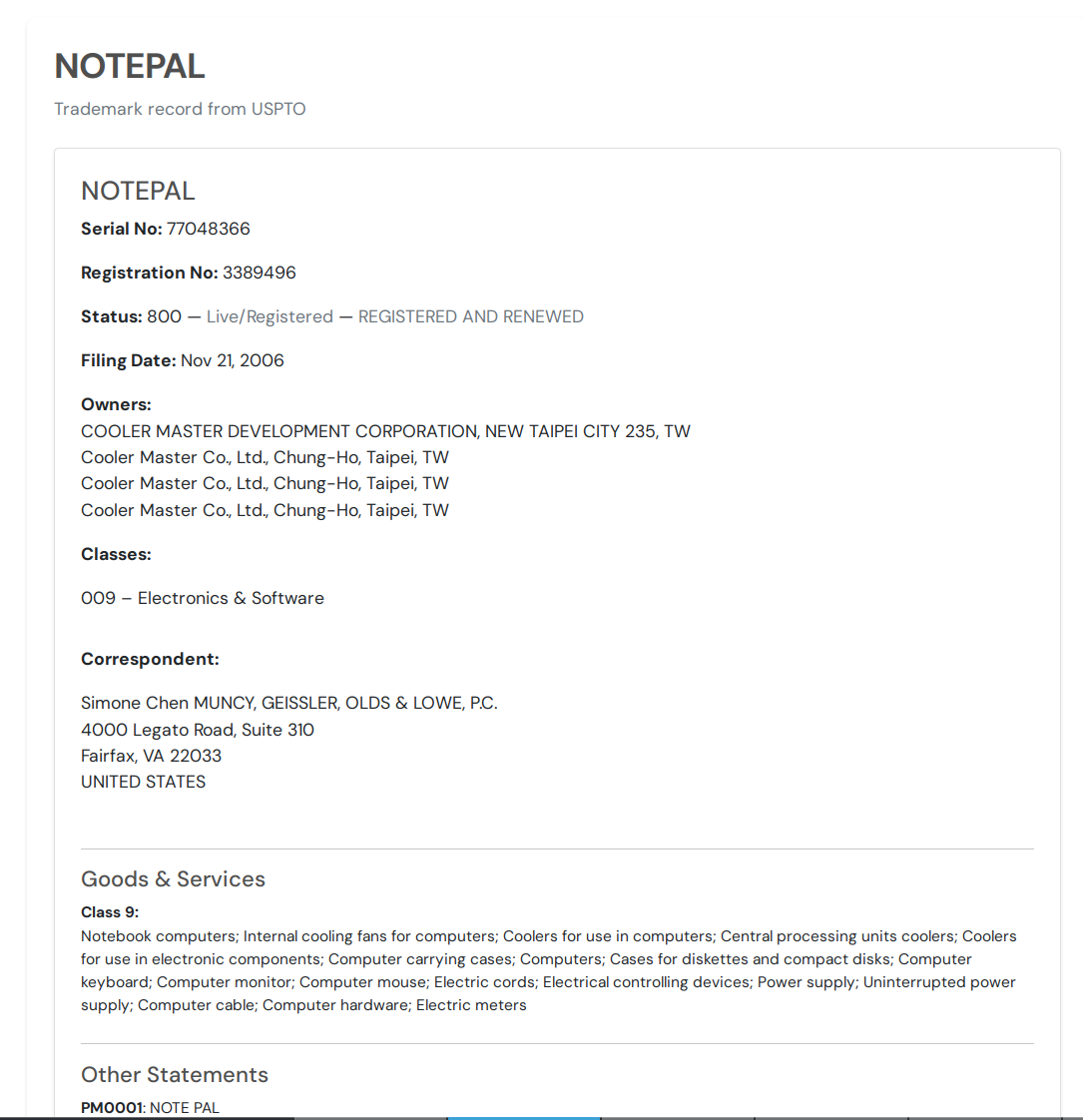
That public record page is useful when somebody only needs to review one result from the report. The link can be forwarded on its own, and the recipient does not need a BrandCat account to open it.
The main thing I still want to improve in the Excel output is trademark/logo imagery. We are gradually collecting more device-mark images from the different trademark sources, so those will make their way into the reports as the coverage improves.
One consolidated alert for a Client or Portfolio
Portfolios and Clients can now have their own trademark alert schedule too.
Instead of receiving a separate email for every watched name, you can configure a consolidated alert for the group and choose how often it should arrive.
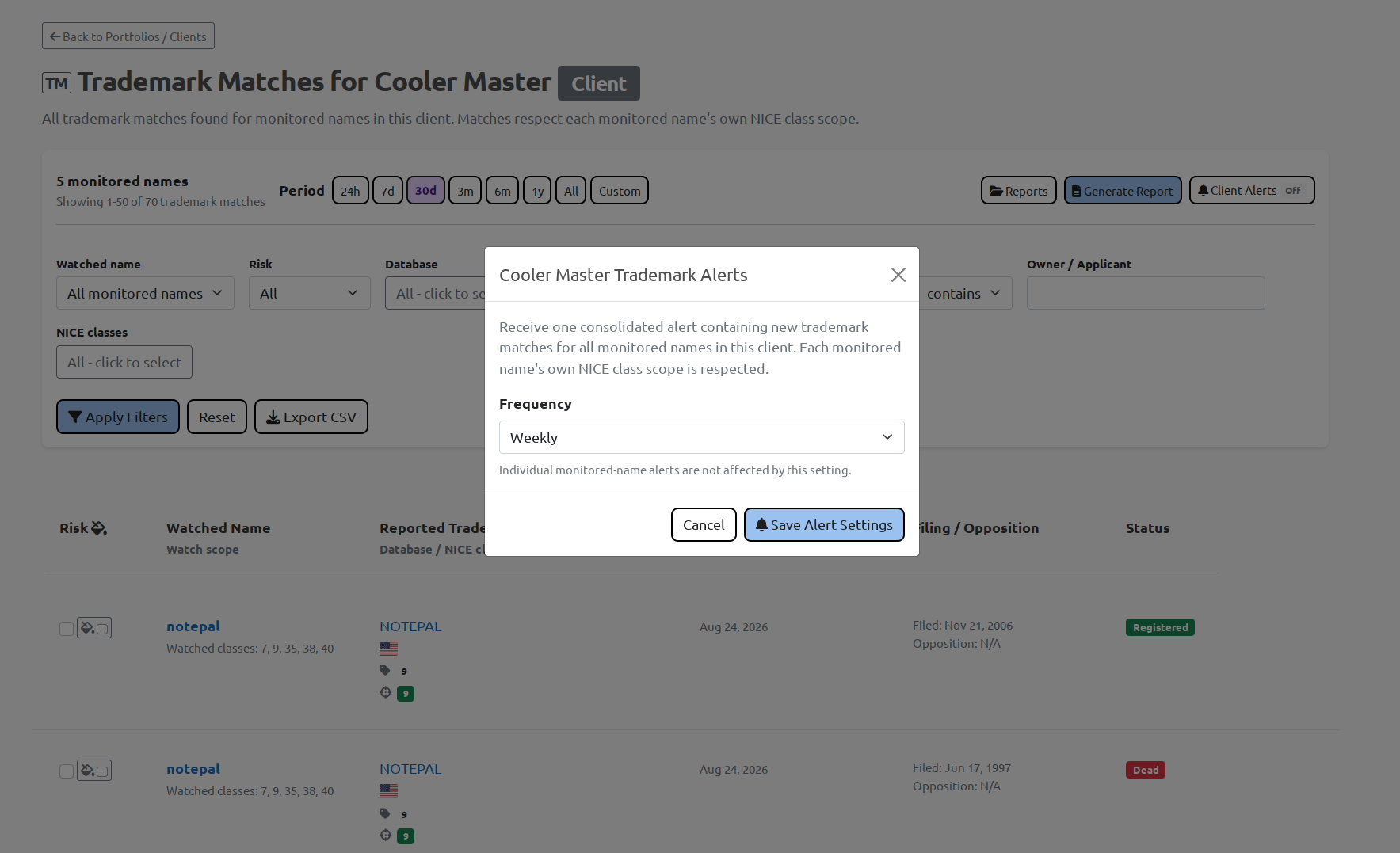
A weekly Client alert, for example, can contain the new trademark matches across all watched names in that client. Each mark still keeps its own Nice class scope when BrandCat decides which results belong in the alert.
Individual watch alerts are still available if somebody wants a different schedule for a particular mark.
Entity Monitoring got quite a bit of work too
While I was rebuilding the trademark side, I also spent quite a bit of time on Entity Monitoring.
BrandCat can monitor trademark activity by:
- owner / applicant
- representative / correspondent
- Goods & Services
Those monitors can be limited to selected Nice classes and can send consolidated email notifications on the configured schedule.
That gives you a different kind of watch from the usual "find marks similar to this name" workflow. You can follow what a competitor is filing, watch a particular representative, or monitor new filings that mention a product/category in Goods & Services.
There is more about that in the earlier Entity Monitoring update.
Quite a lot changed under one fairly boring-looking screen
Most of these additions ended up in a couple of screens and buttons, but there was quite a lot of restructuring behind them.
The current trademark workflow now includes:
- separate Trademark Watch, Domain Watch, Entity Monitor and copycat monitoring structures
- Nice class scope per watched trademark
- visible Nice class overlap on individual results
- Portfolios / Clients
- combined review across all watched marks in a Portfolio / Client
- 24-hour, 7-day, 30-day, 3-month, 6-month, yearly and custom-period review
- filing and opposition information
- risk marking directly in BrandCat
- Client / Portfolio-level reports
- Excel watch reports
- consolidated Client / Portfolio alerts
- expanded Entity Monitoring
There is more I want to add, especially around logo/device-mark images and some of the report presentation, but the basic workflow is now in place.
You can group the marks you are responsible for, give each one its own class scope, review recent matches for the whole portfolio, see exactly where the Nice classes overlap, mark the interesting results and generate one report for the group.
That is a considerably nicer place to be than a giant list of "keywords". 🙂
👉 Trademark monitoring: https://brandcat.io/features-trademark-monitoring
👉 Entity Monitoring: https://brandcat.io/features-entity-monitoring
👉 Start monitoring: https://brandcat.io/sign-up
👉 Contact us: https://brandcat.io/contact
