Trademark Reports, Review Workflows & Alerts
Turn trademark matches into client-ready reports
BrandCat lets you review trademark matches, group watched marks into portfolios or clients, and generate one consolidated report for the reporting period you actually need.
Need the last 7 days for one client? The last 30 days for an entire trademark portfolio? A custom period before a client call? You can generate a fresh report at any time, while each watched mark still keeps its own monitoring settings and NICE-class scope.

Pull the reporting period you need, whenever you need it
Scheduled alerts are useful, but trademark teams do not always work on a fixed schedule. Sometimes a client asks for an update now. Sometimes you need a month-end report. Sometimes you want to review only what appeared in the last week.
BrandCat lets you generate reports for a selected portfolio or client using periods such as the last 24 hours, 7 days, 30 days, 3 months, 6 months, 1 year, or a custom date range.
For example, a Cooler Master portfolio could contain watched names such as COOLER MASTER, CM STORM, MASTERGEL, NOTEPAL, and MASTERFRAME. Instead of reviewing each watch separately, you can pull one report containing the relevant matches across the whole portfolio.
- Generate reports for one watched mark, portfolio, or client
- Use recent-period presets or a custom reporting window
- Keep each watched mark's own NICE-class scope and filters
- Create an on-demand report without waiting for the next scheduled alert
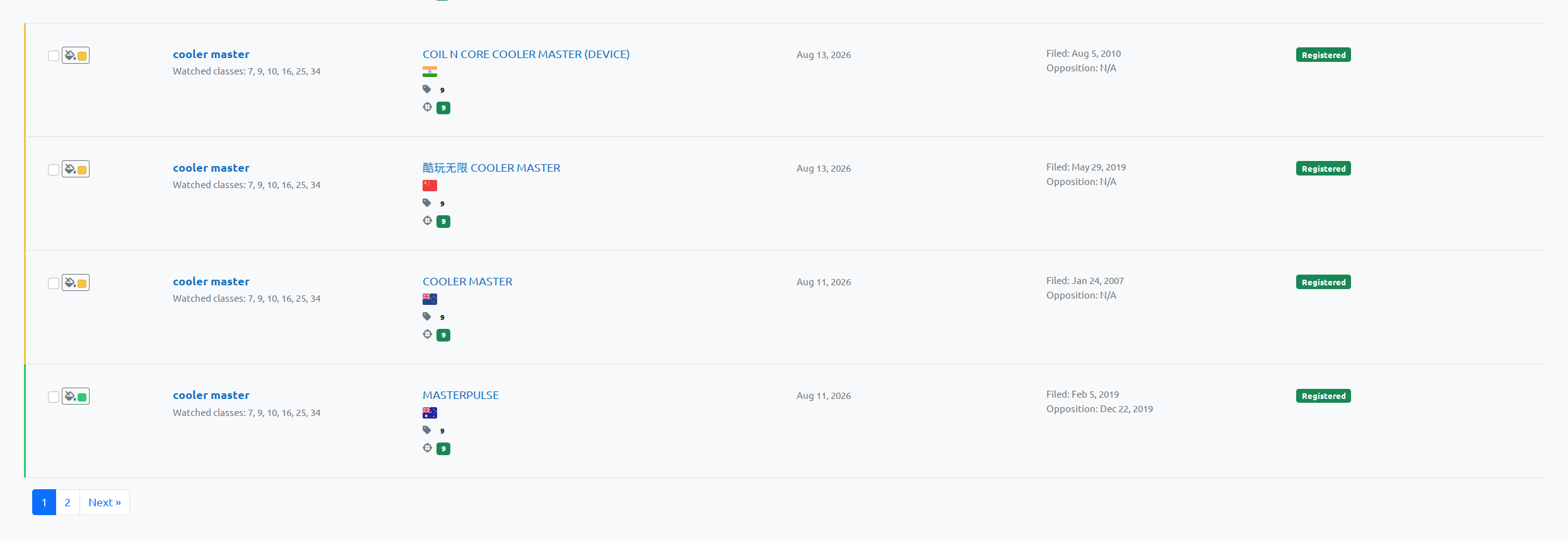
Review and color-code matches before they leave BrandCat
Trademark review is not just about collecting results. Someone still needs to assess them. BrandCat lets reviewers mark individual trademark matches with a review/risk color directly inside the results workflow.
Those review colors are saved per user and per watched-mark relationship, so the assessment belongs to the reviewer and the actual watch context rather than changing the underlying trademark record for everybody.
The same review colors can then be carried into the generated HTML, PDF, and Excel reports, so the report reflects work that has already been done in BrandCat instead of forcing the reviewer to repeat it in a spreadsheet.
- Mark results as unreviewed or with a review/risk color
- Filter results by review color
- Keep review state attached to the correct watched mark
- Preserve the visual review context in exported reports
Excel reports built for real trademark review
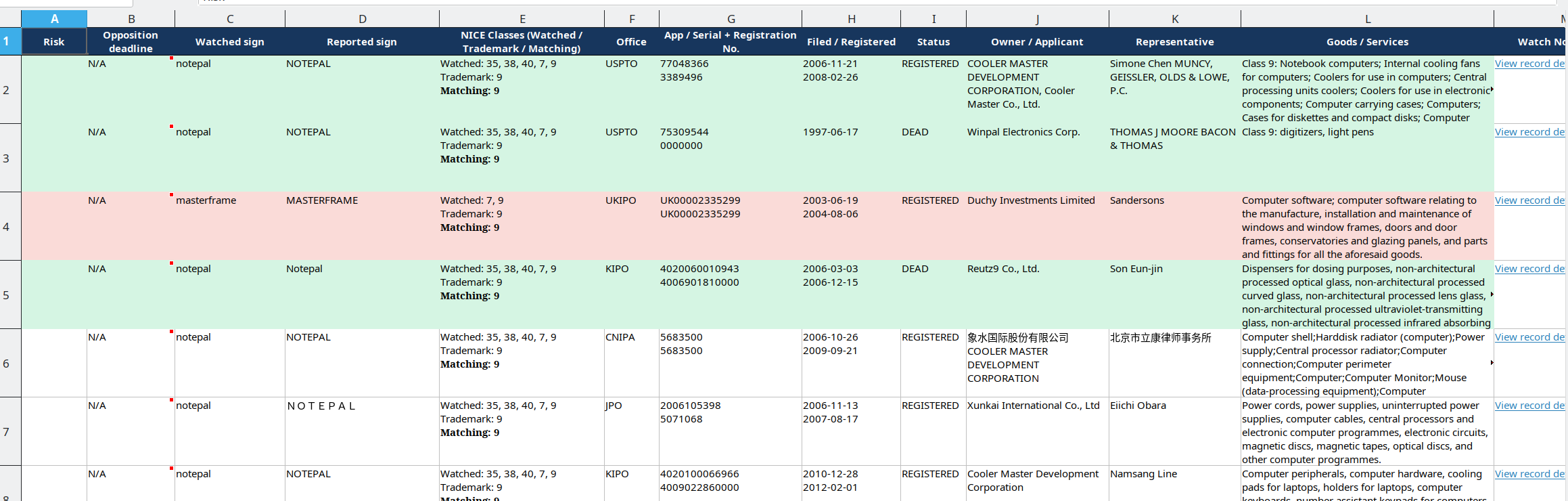
Excel is still one of the most practical formats for law firms and in-house trademark teams. BrandCat can export the reviewed result set into a structured workbook that keeps the fields needed for actual watch-report work.
Portfolio reports can include the watched sign, reported sign, watched and reported NICE classes, matching classes, office, application or registration numbers, filing and registration dates, status, owner / applicant, representative, goods & services, opposition deadline, and links back to the underlying record.
If results were color-coded during review, those colors can appear in the Excel report as well, making it easier to hand the file to a colleague, supervising attorney, or client without rebuilding the review manually.
Each exported match can also include a shareable View record details link. The recipient does not need to be logged in to BrandCat to open the linked trademark record, so the spreadsheet can stay compact while the fuller filing data remains one click away.
- Watched sign and reported sign side by side
- Watched, reported, and matching NICE classes
- Opposition deadline where it can be determined reliably
- Owner / applicant and representative data
- Goods & services text
- Shareable record-detail links that do not require a BrandCat login
- Review/risk colors carried into the workbook
The same reviewed result set also works in HTML and PDF
Not every report needs to be a spreadsheet. BrandCat also keeps a browser-friendly HTML version and can generate a PDF when you need something easier to circulate or archive.
Review colors from the application can remain visible in these formats too, so a match assessed in BrandCat does not lose its context simply because the report was opened in a browser or downloaded as a PDF.
That gives teams a choice between a working Excel file, a quick browser report, or a portable PDF without changing the underlying review workflow.

Keep reports saved, reopen them, or export them again
Reports are not disposable email attachments. BrandCat keeps a report history so you can return to previous snapshots, reopen the HTML version, or download the report again in the format that makes sense for the job.
This is especially useful for recurring client work. If someone asks what was reported last month, you can reopen the saved report instead of reconstructing the same result set from memory.
- Open saved HTML reports
- Download Excel
- Download PDF
- Download CSV
- Re-run reports when you need a fresh snapshot

See the report summary before diving into every match
Reports can also provide a quick overview of the result set, including total matches and office-by-office distribution. This gives reviewers and managers a fast way to understand the scope of a report before working through every individual filing.
The summary is useful context, but the underlying trademark records remain available for detailed review whenever you need to inspect the actual owner, office, classes, dates, goods & services, or filing status.


Set alert frequency per trademark — and per client portfolio
Not every trademark needs the same level of attention. BrandCat lets you set alert frequency separately for individual watched marks, so a high-priority trademark can be checked or reported more frequently than a lower-priority one.
You can also set a separate alert cadence for an entire Portfolio / Client. Instead of receiving unrelated updates one mark at a time, the portfolio alert can bring together the new matches for all watched trademarks belonging to that client.
The portfolio-level alert still respects the monitoring rules saved for each individual mark, including its own NICE-class filter. For example, one mark can be limited to Classes 3 and 5, another to Classes 9 and 25, and both can still appear correctly inside the same consolidated client alert.
- Choose a separate alert frequency for each watched trademark
- Choose a different frequency for the whole Portfolio / Client
- Keep each mark's individual NICE-class scope inside consolidated alerts
- Receive one client-level update instead of rebuilding multiple watch reports manually
Scheduled alerts and on-demand reports complement each other: alerts handle the routine review cycle automatically, while on-demand reports let you pull the exact period you need whenever a client or internal team asks for an update.
One Review Workflow
From reporting period to client-ready report
Pull the last 7 days, last 30 days, another preset, or a custom reporting period.
Work through the trademark results, use each mark's own NICE scope, and add review colors where needed.
Open it in HTML or export the same reviewed result set to Excel, PDF, or CSV.
Try BrandCat Free
Monitor trademarks and domains, review potential conflicts, and turn your results into saved reports and scheduled alerts.
Choose your monitoring plan
Yearly payment plan
Each keyword covers both Domain Lookalike monitoring and Trademark scans across major trademark offices including USPTO, CNIPA, EUIPO, UKIPO, JPO, KIPO and others.
Need Entity Monitoring, higher-volume trademark intelligence, or a custom workflow? Contact us for setup and pricing.
15-day money-back guarantee - No contracts - Cancel anytime
Micro
Small/Micro business, monitoring one critical keyword. Ideal for solo entrepreneurs or small teams.
Keywords limit: 1
Protected domains: 1
15-day money-back guarantee
$7
- per month
$84 per year
Get Started
Scout
For smaller companies needing protection for up to 5 keywords. Perfect for growing teams looking to secure their brand.
Keywords limit: 5
Protected domains: 5
15-day money-back guarantee
$16
- per month
$192 per year
Get Started
Maverick
For medium-sized businesses or trademark protection for multiple products. Supports up to 10 keywords.
Keywords limit: 10
Protected domains: 10
15-day money-back guarantee
$28
- per month
$336 per year
Get Started
BigCat
For large companies or agencies managing many brands and products. Supports 50 keywords with advanced monitoring.
Keywords limit: 50
Protected domains: 50
15-day money-back guarantee
$50
- per month
$600 per year
Get Started
Monthly payment plan
Each keyword covers both Domain Lookalike monitoring and Trademark scans across major trademark offices including USPTO, CNIPA, EUIPO, UKIPO, JPO, KIPO and others.
Need Entity Monitoring, higher-volume trademark intelligence, or a custom workflow? Contact us for setup and pricing.
15-day money-back guarantee - No contracts - Cancel anytime
Micro
Small/Micro business, monitoring one critical keyword. Ideal for solo entrepreneurs or small teams.
Keywords limit: 1
Protected domains: 1
$9
- per month
Get Started
Scout
For smaller companies needing protection for up to 5 keywords. Perfect for growing teams looking to secure their brand.
Keywords limit: 5
Protected domains: 5
$20
- per month
Get Started
Maverick
For medium-sized businesses or trademark protection for multiple products. Supports up to 10 keywords.
Keywords limit: 10
Protected domains: 10
$35
- per month
Get Started
BigCat
For large companies or agencies managing many brands and products. Supports 50 keywords with advanced monitoring.
Keywords limit: 50
Protected domains: 50
$65
- per month
Get Started

2026 BrandCat LLC